Anyone running a UK business knows how many things you have to juggle at once: payroll, employee records, IT kit, and more. HR software can take a lot of that weight off your shoulders. But which platform should you pick when comparing Factorial vs Rippling, two names that come up often for UK businesses?
Both platforms aim to bring HR, IT, and finance together in one place, but they take different paths to get there. This guide on Factorial vs Rippling breaks down what each platform does, who it suits, and how they compare on price, features, and support.
An Overview of Factorial and Rippling
Both Factorial and Rippling help you manage HR, IT, and finance in one place, but they are aimed at different kinds of businesses.
Factorial is an all‑in‑one business platform for small and mid‑sized companies that want one system for people, devices, and spending, without lots of separate tools. It started in Barcelona and now supports thousands of organisations across Europe and the UK.
Rippling is also built to bring HR, IT, and finance together on a single employee record, and is especially popular with larger companies that have more laptops, apps, and costs to control.
Factorial vs Rippling Comparison Chart
A quick overview to compare Factorial and Rippling at a glance.
| Feature | Factorial | Rippling |
|---|---|---|
| Payroll | Guided PAYE | Full HMRC-authorised payroll |
| IT tools | Basic device tracking | Advanced device management |
| Finance tools | Expenses, procurement | Cards, bill pay, spend controls |
| ATS (recruitment) | Yes | Yes |
| Integrations | 80+ | 650+ |
| Pricing | From £5.40/user/month | Quote only |
| Free trial | Yes | Limited |
| Contracts | Monthly available, usually annual | Mostly annual |
Comparing Factorial vs. Rippling
Before looking at the details, it helps to understand what each platform is and who it’s built for. The sections below cover the basics of Factorial and Rippling before getting into how they compare feature by feature.
What Is Factorial?
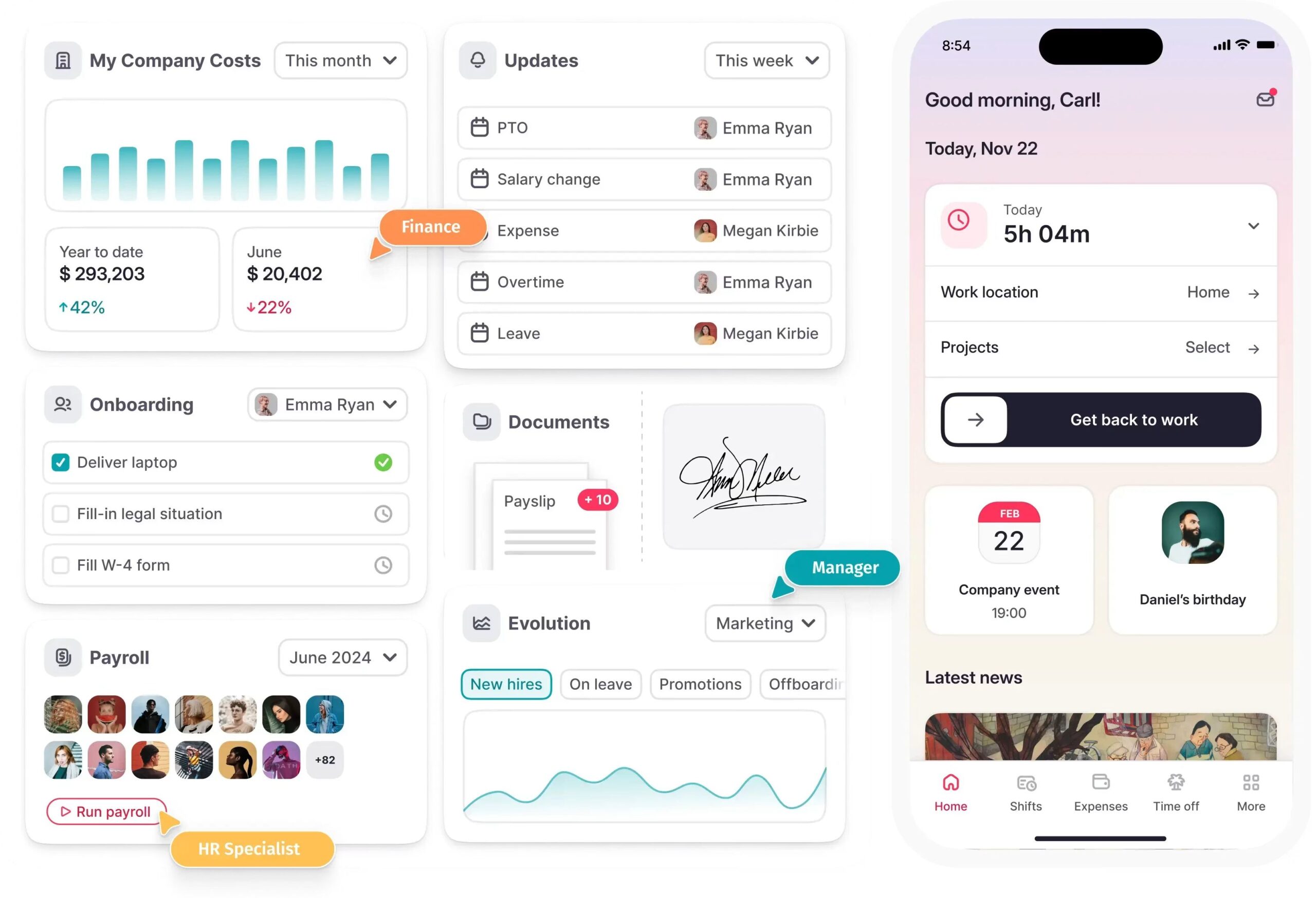
Factorial is an all-in-one AI business management platform built for SMEs that brings HR, IT, and finance together under one system. Its agents don’t just answer questions, they act based on workflows you set, screening candidates, assigning shifts, and handling routine IT and finance tasks on their own. The more of Factorial’s HR, IT, and finance products a business uses, the more context these agents pick up, so they keep getting smarter with every task they handle. Factorial also connects its agents to everyday tools like Slack, HubSpot, and email, meaning you receive support wherever you work. For a growing UK business, this approach ties people, devices, and spending together in one place, freeing up time spent switching between separate systems.
What Is Rippling?
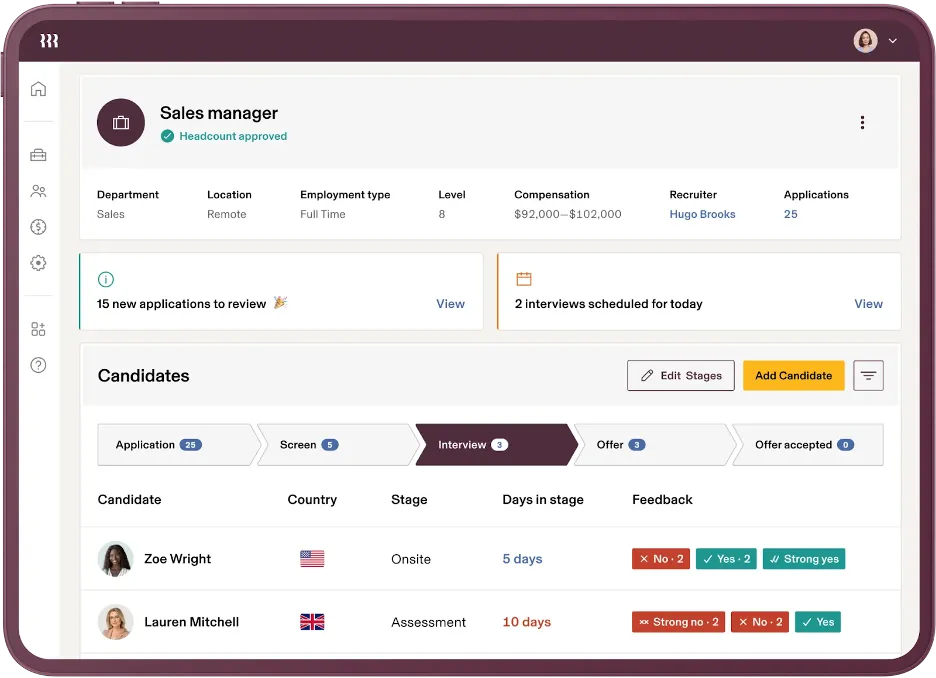
Rippling is a workforce platform founded in San Francisco in 2016. It was originally built as an IT and identity management tool before growing into a full HR and finance platform, and that history still shows in how deep its IT features go. Rippling combines HR, payroll, benefits, and compliance with a strong IT suite that covers device management, app provisioning, and single sign-on across a business. On top of that, it offers finance tools such as corporate cards, expense tracking, and bill pay, all connected to the same employee record.
Factorial vs Rippling: Core Features Compared
Now that we have a broad picture of Factorial and Rippling, let’s look at how they compare feature by feature.
1. Leave and Absence Management
Both platforms handle holiday requests, sick leave, and absence tracking without paper forms. Factorial uses a colour-coded calendar with custom absence types, and absence data flows straight into payroll. Rippling offers similar leave tracking built into its core HR module, with approval workflows that managers can act on from their phone.
2. Time Tracking and Shifts
Factorial lets staff clock in from desktop, mobile, or a QR code, and geolocation tracking shows where remote workers are logging in from. Rippling also offers time tracking tied to payroll, with shift scheduling and overtime rules built in. Both platforms handle straightforward shift patterns well, though Factorial’s scheduling tools are generally seen as more flexible for complex rotas.
3. Payroll
This is one area where the two platforms take a similar path but differ in depth. Factorial automates payroll calculations, manages overtime, and produces payslips in bulk, with a guided PAYE process for UK businesses. Rippling’s payroll goes a step further with HMRC-authorised processing that handles PAYE, National Insurance, and pension auto-enrolment natively, without needing to hand off to a separate provider.
If you want to understand payroll as an employer, the article on PAYE over on GOV.UK is a good place to start.
4. IT and Device Management
Both Factorial and Rippling offer IT management tools. Factorial’s IT suite combined with AI automation lets you order or rent laptops and kit automatically once a new hire is added to your organisation. You can track who has what company devices with mobile device management, lock security settings across Mac, Windows, Linux, iOS, and Android, and enforce encryption to flag risks and ensure data security. This gives a growing business proper control over its devices without needing a separate tool for IT management.
Rippling goes a bit further. Like Factorial, it can also order and ship devices directly and wipe a laptop the moment someone leaves the business, but it can also run custom setup scripts and manage WiFi and VPN logins through its own system. For UK businesses with a hybrid team and more complex IT needs, Rippling’s extra IT features can make it the better fit, though Factorial’s IT tools now cover most day-to-day needs for smaller teams.
5. Finance Tools
Factorial’s finance features cover expense tracking, procurement requests, and tracking costs by project, useful for a growing team that wants to keep spending in check without a dedicated finance system. Rippling also gives you similar expense management features with business expense cards, automated bill pay, and spend controls tied directly to each employee’s role and department.
6. Performance Management
Factorial includes 360-degree reviews, goal-setting, training management, and onboarding workflows, helping businesses that want to track career growth and pull reports on employee performance data. Rippling covers performance reviews and goal tracking too, though it puts the focus more on integration with the rest of its HR suite rather than standalone review tools.
7. Recruitment and Applicant Tracking
Factorial includes a built-in Applicant Tracking System. You can build a careers page, post jobs, filter CVs, and move candidates through a hiring pipeline, with automatic emails sent at each stage. This way, you do not need a separate recruitment tool, which saves you time and money if you hire often.
Rippling also offers recruiting tools as part of its wider suite, letting you manage job posts and candidates alongside onboarding, so a new hire’s IT setup and HR paperwork can start the moment they’re marked as hired.
8. AI Tools
Factorial’s “One” AI agent can generate reports, answer HR questions, summarise meetings, and run staff surveys. The goal is to cut down the time managers spend gathering routine information. Rippling also uses AI automation across its platform, particularly to trigger IT and finance changes automatically whenever an employee’s HR record is updated.
Factorial vs Rippling Pricing
Pricing is subject to change, so always check with each provider directly before making a decision.
Factorial’s UK pricing starts at £5.40 per user, per month for the core HR plan. The platform is modular, so time management, talent management tools, finance, and IT management are all separate add-ons. You’ll need to speak with Factorial’s sales team to get a personalised quote based on your business size and the features you need.
The modular set-up means costs can vary a bit depending on what you use. A small team can use core HR features and pay less than a growing business that needs to add payroll, IT management, and performance tools on top. This modular pricing suits small- to medium-sized businesses for exactly this reason, letting you add more features as you grow. Factorial also offers a free trial and demo, so you can test the platform before signing up and ask any questions you want. Book a free demo now to get to know Factorial better!

Rippling doesn’t publish pricing on its UK site. Every business must first sign up to the base Rippling Platform, then add HR, IT, or Finance modules on top, each billed separately, mostly per employee per month. You’ll need to fill in a quote form and speak to Rippling’s sales team to get a tailored price based on your headcount.
Factorial vs Rippling: Ease of Use
Factorial’s interface is colourful and designed to be easy to start using. Colour-coded calendars and a clean layout make it simple for even non-technical people to get started without training. Its mobile app works well for everyday tasks like clocking in or requesting leave. A mobile app makes it easier for your workforce to adopt.
Rippling’s interface is well organised, but it can feel a bit much at first because there’s simply more going on. Businesses that only need core HR sometimes end up seeing settings built for IT or finance teams too, which can take some getting used to.
Customer Support
Factorial offers live chat, email, and phone support from Monday to Friday, 9 am to 6 pm, with its AI agent picking up first-line questions. It also supports several languages, which is handy for UK businesses with international teams. For most small and mid-sized teams, this covers day-to-day support needs well.
Rippling offers support through its help centre, live chat, and account managers for bigger customers. Users rate it highly for fast responses and technical know-how, which fits its focus on larger accounts that often need hands-on help setting up IT and finance tools.
Integrations
Factorial connects with over 80 third-party tools, including Slack, Microsoft 365, Power BI, Outlook, and Zapier. An open API supports building your own connections too.
Rippling connects with more than 650 apps, covering everything from accounting software to identity providers like Okta and Azure AD. If your business already runs on a wide mix of tools, Rippling’s larger integration library may save time during setup.
Who Should Choose Factorial?
Factorial works best if you:
- Want an all-in-one platform covering HR, finance, and IT at a lower price
- Need a built-in ATS for regular hiring
- Want deeper performance management with goal tracking and reviews
- Are a small or growing SME that wants to add tools gradually as you scale
- Prefer clear, published pricing and a self-serve free trial
Factorial suits businesses that want an easy-to-use platform they can set up quickly without too much customisation needed.
Who Should Choose Rippling?
Rippling works best if you:
- Have a remote or hybrid team with laptops and software access to manage
- Want HR, IT, and finance all linked to one employee record
- Need strong device tools, like remote wipe and custom scripts
- Don’t mind a sales call and signing an annual contract
- Use lots of business apps and want them all to connect easily
Rippling suits growing businesses ready to bring several tools into one platform, even if that means paying more.
Choosing Between Factorial and Rippling
Factorial is a better fit if you are a small or mid-sized UK business that wants clear pricing and a quick set-up. Its core HR plan starts at £5.40 per user per month, and you can add time, talent, finance, and IT tools as you need them. It is easy to learn and covers HR, IT, and finance basics without swamping a small team.
Rippling makes more sense if your business is larger and growing, and you already juggle HR, IT, and finance across different tools. It is designed for companies from roughly 50 up to 1,000 employees that want to manage staff records, laptops, app access, and spending from one system. Its stronger IT features, like wiping a laptop remotely and controlling who can use which apps, are most useful when you have lots of devices and users to keep track of.
The price gap between the two reflects this difference. Factorial’s starting price is public on its website, while Rippling’s cost depends on a custom quote based on your team size and which modules you pick, and often ends up higher once HR, IT, and finance are all turned on.
Both platforms offer demos. Book one with each, bring your team size and your biggest HR and IT problems to the call, and compare what you are shown. The right platform is the one that fits how your business really works day to day, not just the one with the most features on paper.
The information presented on this page is based on publicly available sources as well as on review sites, including Capterra. The comparisons between Factorial and other providers are intended solely to illustrate respective software features, pricing, and functionalities. All information regarding features, prices, and integrations may be subject to change without prior notice. Factorial assumes no liability for the accuracy, completeness, or timeliness of the information presented. We recommend contacting the respective providers directly to obtain the most accurate and up-to-date information. All applicable fair advertising and competition laws are fully observed. If you have any concerns, please reach out to us. The comparisons presented do not constitute a final evaluation or recommendation for any provider but serve solely as an informational source.
Factorial vs Rippling FAQs
Factorial starts at £5.40 per user per month. Rippling requires a quote. For smaller teams, Factorial is usually cheaper, especially if you need Rippling’s IT and finance add-ons.
Yes. Factorial includes device management, IT inventory, multi-OS MDM, and basic endpoint security. However, Rippling offers more advanced IT tools.
Rippling handles PAYE, National Insurance, and pension auto-enrolment directly. Factorial helps with payroll preparation that works well for most small and medium-sized businesses.
Factorial offers a free trial and a product walkthrough, but a personalised quote will help you evaluate the platform best.
Factorial is usually the better choice for small businesses because it has a lower starting price and quicker setup. Rippling is better suited to larger businesses that need slightly more advanced tools alongside HR.