Monitoring employees’ working hours is one of the most basic functions of the human resources department. For UK businesses, accurately tracking employees’ time and attendance is not just an administrative task—it’s a legal requirement. This guide explains how to move beyond manual spreadsheets to an efficient system that ensures compliance and improves efficiency. We’ll provide a free timesheet template to get you started and explore modern solutions for your business.
Key Facts
- Effective time and attendance tracking involves recording employee start times, end times, and breaks to ensure compliance with UK law and accurate payroll.
- Under the UK’s Working Time Regulations 1998, employers must ensure that most employees do not work more than an average of 48 hours per week.
- The average number of sickness absence days rose to a record high of 9.4 per employee in 2025.
- Businesses implementing AI-based systems can gain up to 30% productivity by forecasting staffing gaps.

Why is Accurate Time and Attendance Tracking Crucial in the UK?
Back in the day, it was deemed a simple task to keep track of your employees’ working hours. Workers would come in every morning and punch the time clock. At the end of their workday, they would repeat this action and then go home. This was how time tracking was undertaken in many businesses.
However, times have changed. Nowadays, people are seeking a more fulfilling work-life balance and as a result, their schedules are becoming more flexible. These flexible working arrangements have increased demand for time-tracking software that can accommodate a wider range of working conditions.
Meeting UK Legal Obligations
In the United Kingdom, tracking employee hours is a matter of legal compliance. The Working Time Regulations 1998 set out specific rules that employers must follow to protect the health and safety of their workforce. Key requirements include:
- Maximum Weekly Hours: You must take reasonable steps to ensure an employee’s average working time does not exceed 48 hours per week, typically calculated over a 17-week reference period.
- Rest Breaks: Employees are entitled to a minimum 20-minute uninterrupted rest break if they work for more than six consecutive hours.
- Daily and Weekly Rest: Workers have the right to 11 hours of rest between working days and an uninterrupted 24 hours of rest each week (or 48 hours per fortnight).
Failing to keep adequate records can expose your business to significant risks during HMRC audits or employment tribunals, where judges consistently favour employers who can provide clear, tamper-proof attendance data.
With the new concept of flexible working hours, it has become crucial to find the right system to keep an accurate record of your employees’ hours. Finding the right time and attendance solutions is essential. Nevertheless, more often than not, the task of entering one’s hours is neglected. The result of this is that the tracked hours worked are often left unrecorded in any system. Workers rely on their notes, paper timesheets, email history, and agendas to keep track of time. We all know how reliable these systems are—not very. This type of time tracking is notorious for falling short when it comes to accuracy, being rife with human error.
Accurate Record Keeping
To reduce human error, you can invest in tools that automate time tracking, to improve employee record keeping and employee time management. Using the proper tools is the best way to guarantee accuracy in record keeping. Gone are the days of massive binders full of time cards, Excel spreadsheets, and not to mention the hours of tedious time required to calculate employee hours before payday.
Common Methods for Tracking Employee Time
UK businesses use several methods to track employee hours, each with distinct advantages and disadvantages. Choosing the right one depends on your workforce structure, budget, and operational needs.
| Method | Description | Pros | Cons |
|---|---|---|---|
| Manual Systems (Paper/Spreadsheets) | Employees manually fill out paper timesheets or Excel files. The free template we provide is a good example of this approach. | – No initial cost – Simple for very small teams |
– Prone to human error – Time-consuming administration – Risk of time theft (e.g., ‘buddy punching’) – Difficult to manage for remote/flexible workers |
| Digital Time Clocks | On-site hardware (card-swipes, PIN entry, or biometric scanners) that records clock-in and clock-out times automatically. | – Highly accurate – Reduces administrative work – Prevents buddy punching (biometric) |
– Requires upfront hardware investment – Less suitable for remote or field-based staff |
| Time and Attendance Software | Cloud-based platforms that allow employees to clock in via desktop or mobile apps. Often includes features like GPS tracking, absence management, leave management, and payroll integration. | – Ideal for hybrid/remote teams – Real-time data and reporting – Automates payroll calculations – Ensures compliance with labour laws |
– Requires a monthly subscription fee – Needs employee adoption and training |
How to Create a Manual Timesheet in Excel (Step-by-Step)
Microsoft Excel is a programme that can be used to create a time and attendance spreadsheet for your employees. To start, you will need to install the Microsoft Excel software on your computer. Keep in mind that this is a paid programme that can only be used for a limited time unless your company buys the corresponding licence. If you do not have access to this software, you can utilise an alternative programme such as Google Sheets.
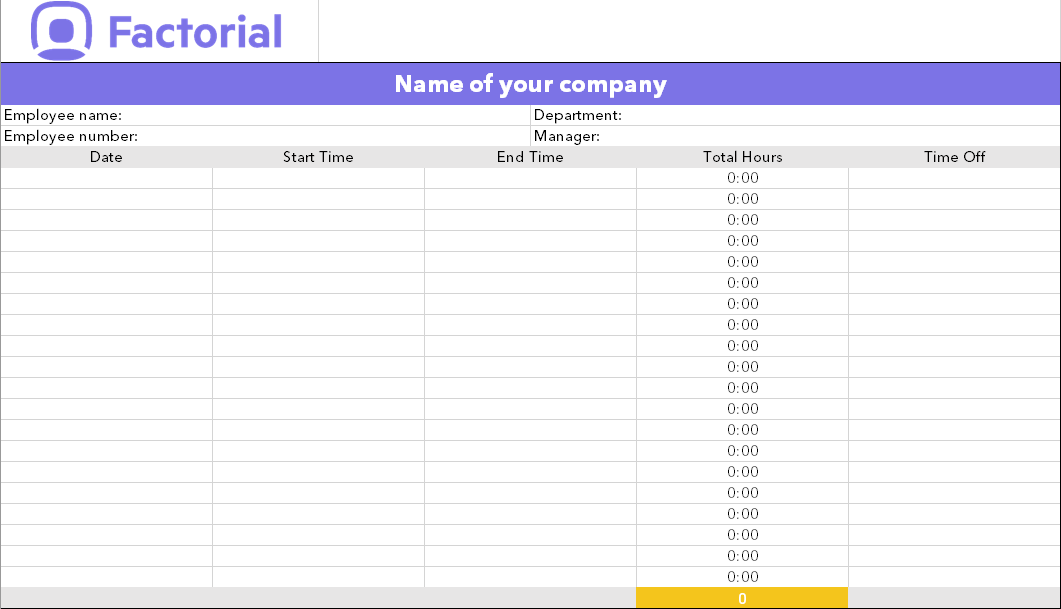
- Create a new Excel file and give it a relevant name so that it can easily be found and recognised. An example would be, Time and Attendance [name of employee] [name of month].
- Enter relevant information such as the name of the employee, employee number, department and manager.
- Create five columns below the information that you have entered in the spreadsheet. These columns can be used for the date, start and end times as well as the total amount of hours worked. The last column can be used for time off, comments or other relevant information that you would like to include.
- Lastly, you can add a formula that counts the number of hours that are entered into the spreadsheet.
If you have followed the steps correctly, you will have a template that looks similar to the one below:
Do you want to save time with your employee time tracking?
We’re not going to lie, entering data in Excel can be a tedious task and take up a lot of precious time. Whether you are looking for reliable automated time and attendance software or want to speed up the process of time tracking, there is a solution for you.
For businesses seeking to eliminate errors and reduce administrative burdens, a cloud-based time and attendance feature offers a powerful alternative. It automates the entire process, allowing employees to clock in via a desktop or mobile app. Managers can then review and approve digital timesheets, which can be used to generate summary reports for better cost control and seamless payroll integration. This digital approach removes the risk of calculation errors and frees up valuable time for HR teams.
The Rise of Flexible and Hybrid Work
The shift towards flexible working arrangements is a key driver for adopting modern time tracking solutions. In the UK, 91% of employers now offer some form of flexible working, with 50% of employees utilising the option to work from home. Manual systems struggle to accommodate varied schedules, but digital tools provide the necessary flexibility and oversight for managing a distributed workforce effectively.
Choosing the Right Time and Attendance Solution
While manual templates are a useful starting point, scaling businesses often find that automated software provides a greater return on investment by reducing payroll errors, ensuring legal compliance, and giving managers real-time visibility into their teams. The right solution saves time and provides the accurate data needed for strategic workforce planning.
Download a free timesheet Excel template for your medium or small business. Manage your employees’ hours with ease from a desktop or mobile device—all in real time with the best time tracking app.
FAQs
How do I track my employees’ time and attendance?
While you can use manual spreadsheets, they are time-consuming and prone to error. The most accurate and efficient method is an automated system like Factorial, which allows employees to clock in easily and provides managers with real-time data for simplified workforce management.
Is time and attendance the same as payroll?
No, they are two separate but connected functions. Time and attendance systems capture employee work hours, and payroll systems use this data to calculate pay. Using an all-in-one HR platform like Factorial ensures this data flows seamlessly, guaranteeing accurate and compliant payroll.
What is the KPI for time and attendance?
Key performance indicators (KPIs) for time and attendance include absenteeism rates, overtime hours, and punctuality. These metrics help HR measure workforce reliability and manage labour costs effectively, providing insights into overall productivity and employee engagement.