Keeping track of company equipment, like laptops, monitors, and headsets, requires teams to be organised, thorough and efficient. Particularly when IT assets are moved between employees and teams daily. Old processes like manually checking in and out equipment are no longer efficient. Particularly, as your team grows, it becomes complicated and is hard to keep records properly updated by hand. Whether you manage a hybrid, remote, or in-person team, keeping your IT asset records in sync is far more challenging than it used to be.
Digitising manual tracking with an IT asset management software saves your team time and effort. Especially if your company is manually checking in and out a large number of equipment items daily. Investing in an IT asset management software ensures your IT operations run smoothly while giving companies one system to track assets, ownership, usage, location and status of every device or subscription.
What is IT Asset Management Software?
IT asset management software (ITAM) is a platform that helps IT teams track and manage their company’s IT assets from the beginning to the end. This includes procurement, deployment, maintenance, collection, and disposal. Companies can manage both physical assets, like devices, and also subscriptions, like software licenses. ITAM connects every stage of IT management in one centralised platform for IT managers to optimise their tech stack and prevent any unnecessary replacements or subscription renewals.
📌 In a rush? Check out of best IT asset management software overview
Why UK&I Businesses Need IT Asset Management Software in 2026
Managing IT assets is getting harder because companies use more devices and more software than ever before. In today’s modern landscape, teams are often working remotely, hybrid or from different locations. This means UK&I IT teams could be managing devices from Manchester to Dublin and accounting for ownership changes between these teams or locations. To put it point-blank, old IT tracking methods simply cannot keep up and account for all the IT demands of modern teams.
Security and compliance are also important. When assets are not tracked properly, risks increase. Lost laptops, unused user accounts, and outdated devices can all cause problems that can be avoided with preparation. IT asset management software helps teams remove access on time, secure devices, and keep clear records for audits like SOC 2. By utilising the best IT asset management software on the market, you can ensure your company meets GDPR compliance and is in accordance with ISO 27001 for secure data protection.
Additionally, IT teams that are still using spreadsheets or notes to track assets are spending valuable time updating their records, and mistakes can easily occur. When one update isn’t logged somewhere, devices can disappear from the records and software licences continue to be paid for when they shouldn’t. This process breaks down as your team starts to scale, making manual tracking a nonviable option to grow your team and company.
Best IT Asset Management Software in 2026
Finding the right IT asset management software can be overwhelming. There are many tools on the market, each with different features, pricing, and integrations. Making the right decision is vital, particularly for UK and Irish businesses looking to meet compliance – making this list a valuable resource to narrow your search. The best platforms are easy to use, scale with your company, and help you track devices, software, and licenses without extra work.
Read about the top tools for 2026 below. Each review includes key features, who the software is best for, and pricing information where available.
1. Factorial
Factorial IT is a top IT asset management software designed to simplify how companies track devices, software, and licenses. It connects IT operations with HR and finance, giving teams a single place to manage the full lifecycle of every asset. It has modern integrations with Microsoft and other modern tools that make adding Factorial’s IT asset management software to your current tech stack seamless.
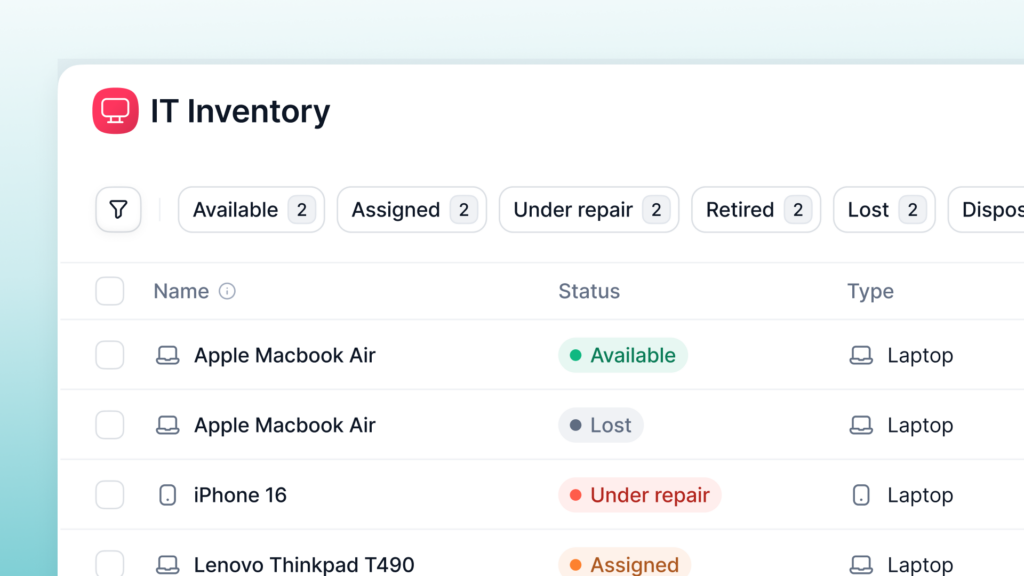
Key IT Asset Management Features in Factorial
- Full Asset Lifecycle Management: Track hardware and software from purchase to retirement.
- Multi-OS Device Management: Manage Windows, macOS, Linux, and Android devices in one platform.
- Automatic Provisioning and Deprovisioning: Assign and revoke access automatically when employees join, change roles, or leave.
- SaaS and License Management: Track all apps, subscriptions, and licenses with automatic updates and alerts.
- Global Hardware Procurement: Order and ship devices to over 60 countries, with 0-touch deployment.
- Security and Compliance: Built-in SOC 2 readiness, audit logs, and encrypted device management.
- AI-Powered Tools: Smart workflows, predictive device management, and autonomous issue resolution.
Connect Factorial IT with HR and Finance
One of Factorial IT’s standout features is its integration with HR and finance systems. When HR updates employee records, Factorial automatically adjusts device assignments and app access. This connects IT with onboarding to ensure your new hires have all their technology ready to go and set up from day one. Additionally, finance teams can see IT spend in real-time, helping to control budgets and reduce wasted licenses.
Who Factorial Is Best For
Factorial IT is ideal for growing companies or teams that want a unified platform instead of switching between multiple tools. It works particularly well for:
- Organisations with hybrid or remote employees across distributed teams throughout the UK&I
- Companies managing a large number of devices that need to scale long-term
- Teams that need to meet compliance and audit-ready reporting for GDPR, ISO 27001, and more.
- Teams that already have HR software and want an IT asset management software to complement their tech stack
Price
Factorial’s pricing is scalable and depends on company size and features. It avoids per-device fees, making it easier for growing companies to plan costs without hidden charges. You can request a demo to get a detailed quote.
2. Jira Service Management
Jira Service Management is a popular platform for IT teams that need both asset tracking and service management. It combines ticketing with IT asset visibility, making it easier to manage hardware, software, and employee requests in one place.
Key IT Asset Management Features in Jira
- Centralised asset database for hardware and software
- Integration with other Atlassian tools and popular IT applications
- Ticket and workflow automation
- Reporting for audits and IT compliance
Who Jira Is Best For
Jira is best for teams already using Atlassian products or companies that need strong ITSM features alongside asset tracking. It works well for mid-sized to large organisations that want customisation and workflow automation.
Price
Jira offers tiered pricing based on users, with a free plan for small teams. Paid plans provide more advanced features and reporting.
3. Lansweeper
Lansweeper is a comprehensive IT asset discovery and inventory platform trusted by over 20,000 organisations worldwide, including major UK brands. It provides complete visibility across your entire IT estate through agentless scanning and automatic discovery.
Key IT Asset Management Features in Lansweeper
- Automatic scanning for hardware and software inventory
- Modern integrations
- Real-time reporting and dashboards
- Software licence compliance and optimisation
Who Lansweeper Is Best For
Lansweeper is best for mid-sized to large UK organisations needing comprehensive visibility across complex IT estates. It’s particularly strong for companies with multiple locations, distributed teams supporting remote staff across different regions, or hybrid infrastructure combining on-premises and cloud assets.
Price
Subscription-based pricing that scales with asset count. Free trial available to test the platform before committing. Contact for specific UK pricing.
4. ServiceNow ITAM
ServiceNow is an enterprise-grade platform offering robust IT Asset Management as part of its broader IT Service Management suite. It’s widely used by large UK enterprises requiring mature governance and compliance capabilities.
Key IT Asset Management Features in ServiceNow ITAM
- Enterprise level lifecycle management
- Advanced automation and workflow capabilities
- Software license and subscription management
- Reporting and analytics for IT spend and compliance
Who ServiceITAM Is Best For
ServiceITAM is best for large companies with complex IT management needs. This platform provides a robust framework for compliance and integrations.
Price
Enterprise pricing is typically part of a broader ServiceNow platform subscription. Custom quotes based on organisational size and requirements.
5. Freshservice
Freshservice is great for companies with basic ticketing and service needs. This platform is a popular cloud-based option that provides an integrated helpdesk and asset tracking. Its clean interface makes it suitable for teams that want something simple enough that helpdesk staff won’t complain. More importantly, it doesn’t require companies to juggle multiple platforms as it combines ticketing, asset tracking and service management in one.
Key IT Asset Management Features in Freshservice
- Licence management with renewal alerts
- Mobile app to manage IT assets from your phone
- Centralised asset database for hardware and software
- Supports compliance with audit logs
Who Freshservice Is Best For
Freshservice is ideal for small to mid-sized UK companies. Additionally, for any organisations that want basic ticketing and service requests alongside asset management.
Price
Tiered subscription pricing starting with a free plan for small teams. Paid plans unlock advanced features and reporting. UK pricing available on request, excludes VAT.
Best IT Asset Management Software Comparison Chart
The chart below shows the main strengths of each platform, who it works best for, and what size company it suits. It makes it easier to compare them quickly.
| Platform | Key Strengths | Best For | Ideal Company Size |
| Factorial | Full asset lifecycle management, HR & finance integration, multi-OS support | Companies wanting one system for devices, software, and people | Small to mid-sized, growing teams |
| Jira Service Management | Customisable workflows, Atlassian ecosystem integration | Teams already using Atlassian products | Mid-sized to large organisations |
| Lansweeper | Market-leading asset discovery, agentless scanning, comprehensive inventory | Organisations needing complete IT estate visibility | Mid-sized to large companies |
| ServiceNow ITAM | Enterprise CMDB, workflow automation, compliance | Large enterprises with mature IT governance | Enterprise organisations |
| Freshservice | ITSM + asset management, 50,000+ business users globally | Teams needing integrated helpdesk and asset tracking | Small to mid-sized companies |
How to Choose the Right IT Asset Management Software for Your Business
Choosing the right IT asset management software can be tricky, but asking the right questions makes it easier. The goal is to find a tool that fits your team, your devices, and your workflows.
Meet UK Regulatory Requirements
GDPR requires organisations to adhere to specific regulations when it comes to storing personal data, which includes data on employee devices and within applications. That’s why the right ITAM needs to comply with GDPR and HR compliance, Cyber Essentials or ISO 27001 – all of which require detailed asset inventories and controls. This legal complexity makes it critical that IT asset management software assist UK businesses in maintaining audit-ready records, tracking data and protecting personal data. The best IT asset management software will fulfil these needs while eliminating manual work for IT teams.

Questions to Ask Before Buying
Who owns the assets?
Understand whether devices are assigned to employees, departments, or shared across teams. Some software works better for individual ownership, while others handle shared equipment easily.
How often do devices change hands?
If laptops, phones, or other devices move frequently between employees, you need a system that can track changes quickly and automatically.
Do you need HR or finance integration?
Connecting your IT system to HR or finance software can save time on onboarding, offboarding, and budgeting.
How many devices and licenses will you track?
Make sure the platform can handle your current inventory and can grow as your company grows.
Do you need remote management or helpdesk features?
Some tools include device monitoring, patching, or ticketing. Decide if these features are important for your team.
Things to Avoid
- Overbuying enterprise tools: Don’t pay for features your team won’t use.
- Software that doesn’t integrate: Make sure it works with your existing systems.
- Tools that are hard to learn: A complicated system slows down your IT team instead of helping.
Ask these questions and focus on choosing a tool for simplicity, scalability, and integrations so you can find a platform that saves you time, improves security, and keeps your IT assets organised.
Choose Factorial IT for Minimal Manual Work
Factorial IT is a strong choice for companies that want one platform to manage all IT assets. It tracks devices, software, and licenses, while connecting with HR and finance systems. This reduces manual work, keeps records accurate, and helps your team stay secure and compliant. Moreover, Factorial’s IT asset management software connects to all your core workforces like HR, finances and employee performance. For growing teams or companies moving away from spreadsheets and scattered tools, Factorial makes managing IT easier and more efficient – along with your already existing business workflows.
IT Asset Management Software FAQs
1. What are the 3 main deliverables of IT asset management?
- Inventory tracking: Know every device and software license you own.
- Lifecycle management: Manage assets from purchase to retirement.
- Compliance and reporting: Keep accurate records for audits and security checks.
2. Which IT management software is best?
The best software depends on your company’s needs. Factorial IT works well for teams that want one system for all devices, software, and integrations. Other tools like Jira, NinjaOne, Atera, or CiraSync may be better if you need specific features like remote monitoring or Microsoft 365 integration.
3. How does ITAM improve security?
IT asset management ensures devices and software are tracked, updated, and assigned to the correct users. This reduces lost or unmonitored devices, removes access when employees leave, and helps prevent security risks.
4. Can Factorial IT integrate with my existing HR platform?
Yes. Factorial IT connects with many HR systems to automatically manage employee onboarding, offboarding, and device assignments, saving time and reducing errors.
Disclaimer: The information presented on this page is based on publicly available sources. The comparisons between Factorial and other providers are intended solely for the illustration of the respective software features, pricing and functionalities. All information regarding features, prices, and integrations may be subject to change without prior notice. Factorial assumes no liability for the accuracy, completeness, or timeliness of the information presented. We recommend contacting the respective providers directly to obtain the most accurate and up-to-date information. All legal regulations regarding Spanish fair advertising and competition law are fully observed by us; if you have any concerns, please reach out to us. The comparisons presented do not constitute a final evaluation or recommendation for any provider, but serve solely as an informational source.